Your phone runs the trade. Not just shows it.
Turbo builds you a dedicated cloud machine beside your broker's servers, MT5 already running on it — single-digit milliseconds to the broker on a measured box. Then it hands you the whole cockpit in a browser: flip, close your worst half, break-even everything, size with a stepper you can't fat-finger. Every command, on every device. Walk away from the desk with the trade still on.
MT5 on your phone is a viewer.
Aurivo is a cockpit.
You already know what the MT5 app is like at the exact moment you need it: menus inside menus, a lot field that lets you type 10.0 when you meant 0.10, and half the things you actually want to do simply aren't there. So you stay chained to the desk.
The MT5 mobile app
- Close positions one at a time, through a menu, while price runs
- No flip. No "close my worst half". No break-even on everything at once
- Lot size is a text box — one stray zero and you're 10x too big
- No average price across your layers; you're doing maths on a phone
- Want real control? Go back to the computer. So you never leave it
Aurivo on your phone
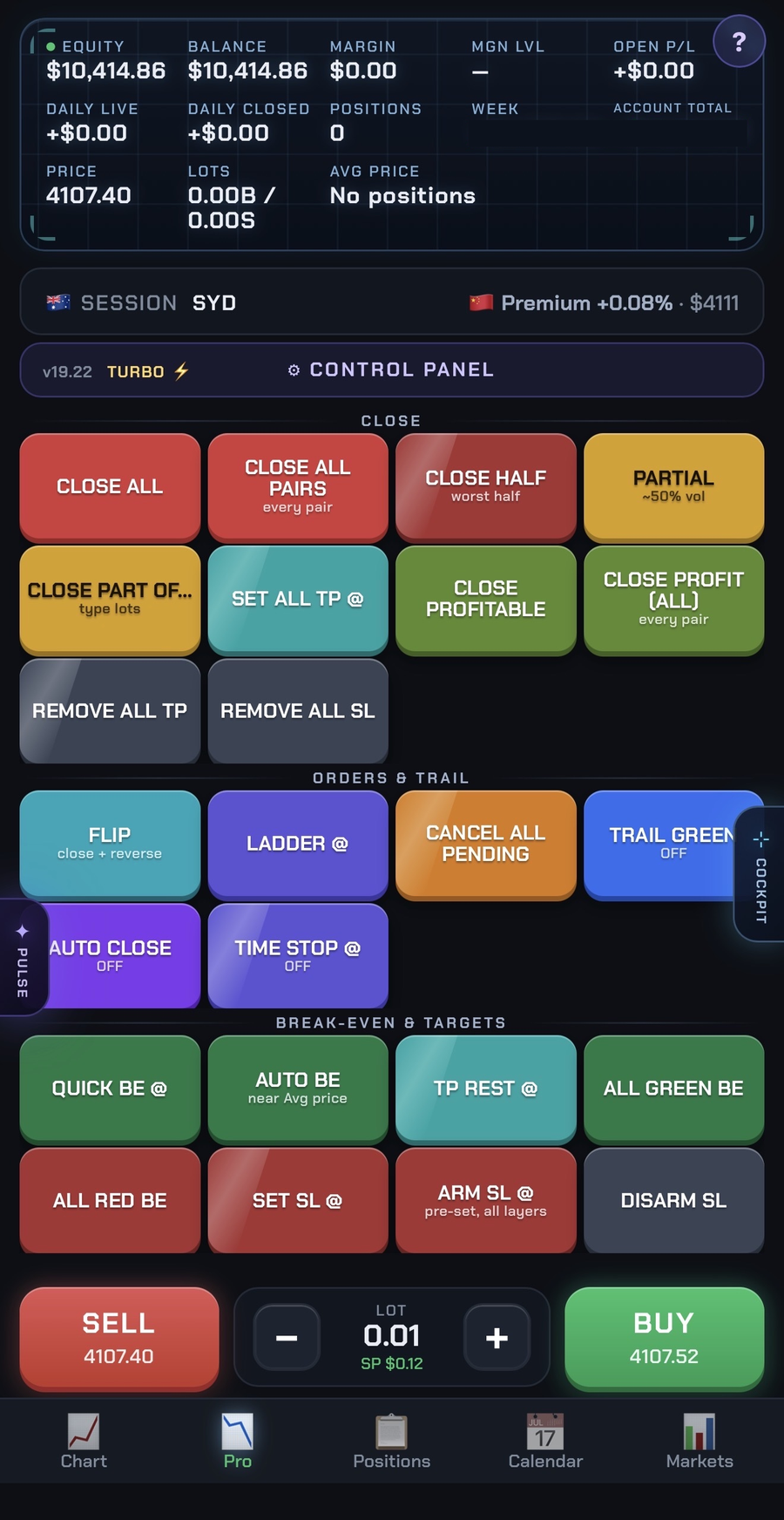
- Every command you have on desktop — same buttons, same taps
- Flip, Close Half, All Green BE, Partial, Ladder, Time Stop — one tap each
- Lot size is a stepper, not a text field. You can't fat-finger it
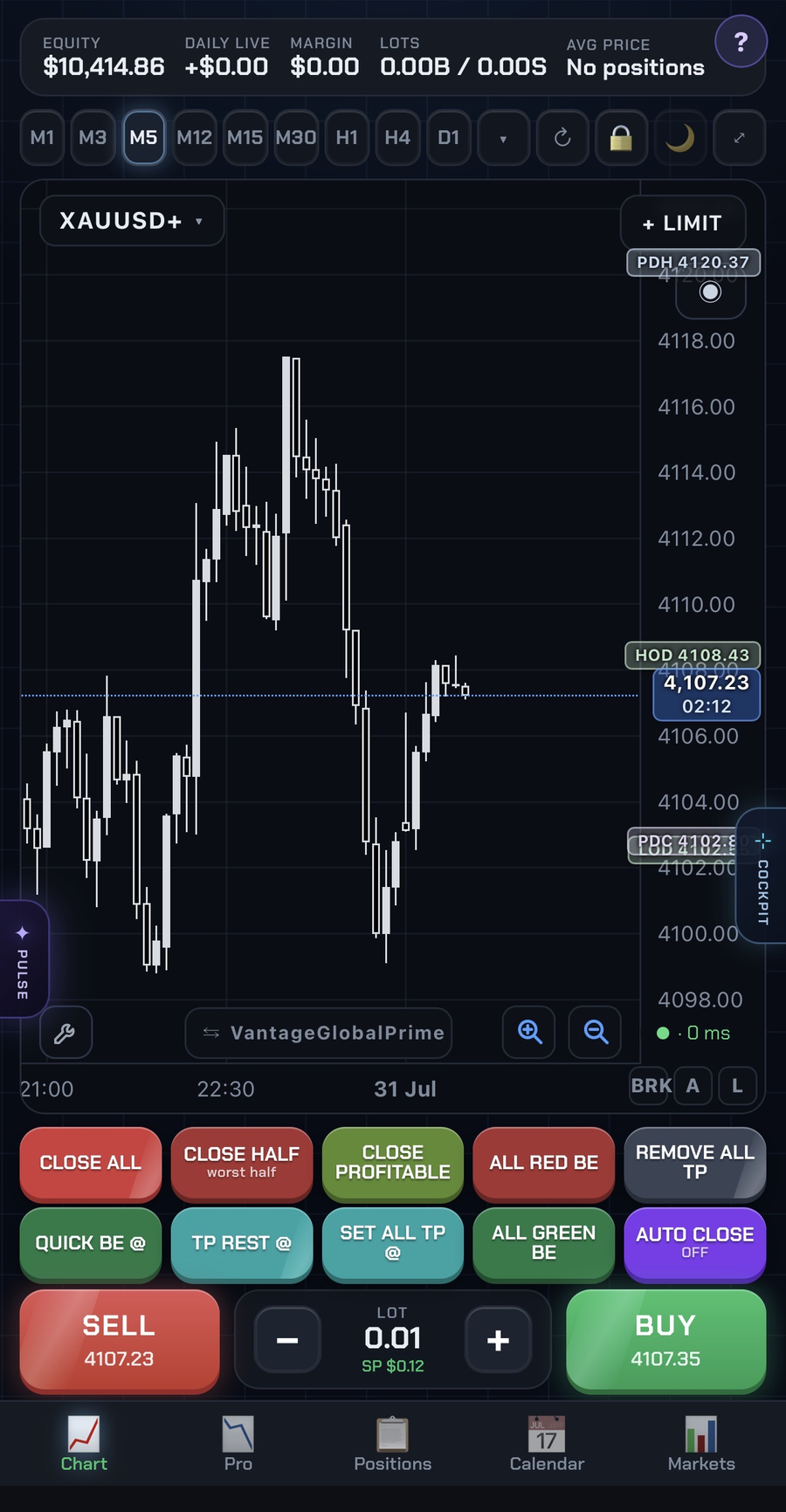
- Your true average entry, drawn on the chart, across every layer
- Manage a live stack from a car park, a café, the gym — and mean it
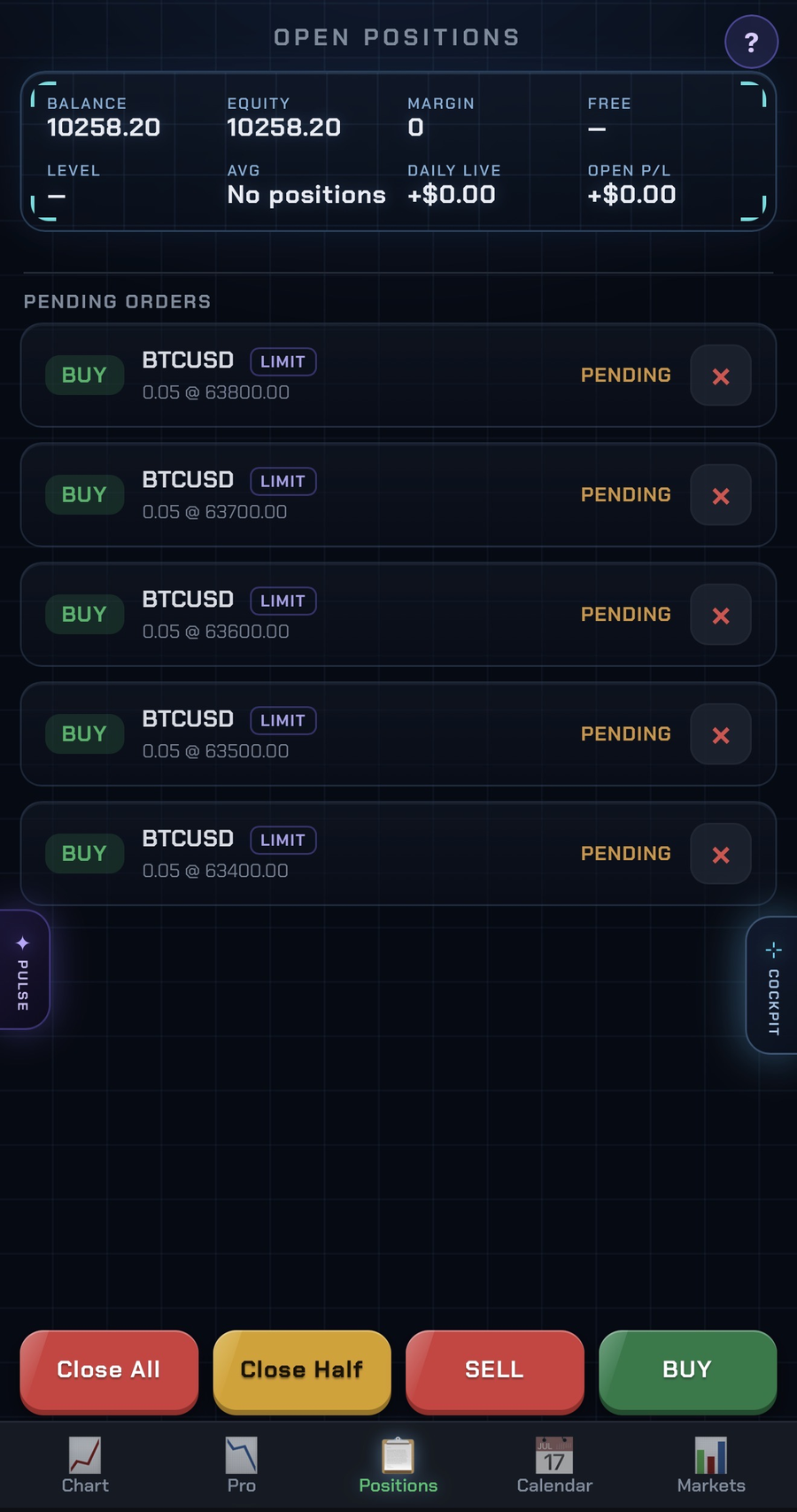
Five tabs. All of it on your phone.
Pro, Chart and Positions are real screenshots from a live Turbo panel. Everything you see here is on the phone in your pocket, at the same size, with the same taps.
Your trade leaves from next door, not from your kitchen.
Scalping is decided in milliseconds. Your Turbo box is placed in the same region as your broker's matching engine — so the distance your order travels is measured in metres, not oceans.
One measurement, on a live Turbo box to one broker server. Your own latency depends on your broker and region — this is an example, not a guarantee.
Tick-aligned candles, gzip'd, broker-time corrected. The chart you see is the chart the server sees.
Your trails, stops and pendings keep running after you shut the laptop, lose wifi, or get on a plane.
Trading from your own PC
- 100–300 ms to your broker — over home wifi, through your ISP
- Slippage on every fast fill; the worse the news candle, the worse the fill
- Laptop sleeps → your trail stops trailing
- Windows updates, antivirus, a Zoom call — all competing with your terminal
- Power cut, dropout, or a closed lid can leave a position naked
Trading on Aurivo Turbo
- Single-digit ms to your broker — the box sits beside them
- Order lands before the spread widens on you
- Machine never sleeps; management runs whether you're watching or not
- One dedicated box doing one job: your MT5
- Close the lid mid-trade, reopen on your phone, everything's still there
Built by a trader who scalps for a living. Tested hardest where it’s hardest.
Aurivo wasn't designed in a vacuum — it was built scalping XAUUSD, so it carries instruments most panels don't have. Every one of them works the same on any pair you trade.
Shanghai gold premium
Live SGE Au99.99 against international spot — the number that tells you what physical gold is really doing in the East while the West prices paper. Premium widening means Chinese buyers are pulling metal; a flip to discount is a different day entirely. Read straight off your panel, with the change since the last session.
Session edge map
Asia, London, New York — and the overlaps where gold actually moves. Know which session you're standing in and what it usually does before you size up.
Zones & average price
Your levels drawn on the chart, and your true average entry across every layer — right there, not worked out on a calculator while the candle runs away from you.
Markets & COT at a glance
Gold, BTC, indices, the dollar — the day's moves on one tab, plus the CFTC's weekly managed-money net position in gold (COT) with its week-on-week change. Market context to read, never a buy or sell signal.
A journal that writes itself
Every closed day logged automatically: P&L per day, win rate, best day, average day, and an equity curve you didn't have to build in a spreadsheet. Export a stats card straight to Discord.
Panic buttons that work
When gold spikes 40 pips against a stack of layers, "Close Half", "All Green BE" and "Flip" are one tap — not eleven right-clicks while the loss grows.
Buy it. Open the link. Trade.
There is no software to download and nothing to configure. The moment you check out, your machine starts building itself.
Check out
Buy Aurivo Turbo. That's the last decision you have to make.
Your box builds itself
A dedicated cloud machine is ordered for you, MT5 and the Aurivo panel are installed, and your licence is activated — automatically, even at 3am.
You get an email
Your private link (yourname.aurivo.trading) and password arrive as soon as the machine is ready — usually within 5 minutes.
Accept, connect, trade
Open the link and accept the terms once. Then add an account — either the built-in Aurivo demo in one tap, or your own broker's MT5 login. Aurivo remembers you; every visit after that goes straight to the chart.
A machine that never sleeps, and a panel built for speed.
Turbo isn't a web page pretending to be MT5. It's a real MT5 terminal on a real machine — one that lives near your broker and stays on after you close the laptop.
Your own cloud machine
Dedicated, not shared. MT5 runs on it 24/7 so your stops, trails and pending orders stay alive whether or not your computer is on.
Sat next to your broker
The box is placed close to your broker's servers, so orders land in single-digit milliseconds. Latency is where scalping is won or lost.
Any device, one link
Mac, Windows, iPad, iPhone, Android. Same panel, same account, same positions — open the link and you're in.
One-tap execution
Flip a position. Close only your worst half. Move every winner to break-even at once. The things MT5 makes you click ten times to do.
Live charts, your timeframes
Favourite timeframes, candle countdown, your average price drawn on the chart. Markets, Positions and Calendar tabs alongside.
You place every trade
Aurivo never trades for you. It's a control panel — it just makes execution and management brutally fast.
Every button you wished MT5 had.
One tap, on any device. No scripts, no right-click menus, no dragging things onto charts.
Why I built this.
I trade gold for a living. Mostly scalps — in and out, sometimes a few positions at once, and the difference between a good exit and a bad one is often a few seconds.
For a long time that meant I couldn't leave my desk. Not because the market needed me there, but because MetaTrader on a phone is a viewer. You can watch a position and you can close it, but managing a basket properly — flipping, taking half off, pulling every stop to break-even — is fifteen taps through menus you can't afford to fumble.
So I stayed at the screen. I would think twice about walking out for a coffee. And there were setups I simply didn't take — not because I didn't like them, but because I knew I wouldn't be sitting in front of the platform when they needed managing. That is a strange way to run a business: letting the tools decide which trades you are allowed to want.
Aurivo started as hotkeys for my own terminal. Then voice commands. Then a way to reach it from my phone. None of it was a product; it was me trying to get an hour of my life back without giving up control of a trade.
What turned it into something other people could buy was realising the problem wasn't mine. Every scalper I know is doing the same thing — sitting in front of a screen not because the trade needs watching, but because the tools only work in one place.
I use Aurivo every day, on the same setup I sell. When something is slow, I feel it before you do. That isn't a marketing line — it's why the panel gets rebuilt as often as it does.
What they actually reach for.
Four traders running Aurivo on their own live accounts, in their own words.
“When I want a position on, I don’t take it in one hit — Ladder @ puts the limits in across the area, in portions. And once a trade’s safe, All Green BE locks it there in one tap so I’m not giving anything back to the market.”
“Close Half is the one MT5 never gave me. And Auto Close means I set my number and walk away — the exit happens whether I’m watching or not.”
“I’m scalping, so most positions get Quick BE @ straight away. The ones I want to run get TP Rest @. Two taps and the whole book is handled.”
“When it’s moving fast the turbo lot row lets me size without touching a keyboard. All Green BE does the rest.”
Aurivo clients trading their own live accounts. Each approved the wording of their own quote before it was published. Individual experience only — not a representation of results, and nothing here is advice or a recommendation.
Try it free for seven days. Then judge the price.
A bare trading VPS — an empty Windows box, nothing installed, no support — is $25–$40 a month on its own. Turbo is that box, already built, with the panel on top.
Cancel any time. No setup fee. Nothing charged until day 8.
Check that your broker permits third-party trading software before subscribing. Not available to residents of the United States, Canada, the United Kingdom, or the European Union or wider EEA.
The questions everyone asks.
Is there a free trial?
Yes — seven days, the full product. Your own cloud machine, the panel, every command, nothing held back. You enter card details at checkout so the machine can be built, and nothing is charged until day eight.
You do not have to connect your broker to try it. The panel has a built-in demo account you can open in one tap, so you can spend the week driving the real product before deciding whether to point it at live money.
What happens when the trial ends?
If you do nothing, the subscription starts at $39.99/month and your machine keeps running exactly as it is. If you cancel before day eight you are not charged and the machine is released. You cancel from your own Whop account in two clicks — you never have to email us for it.
Do I have to install anything?
No. Nothing is downloaded to your computer and nothing runs on it. Your MT5 lives on a cloud machine we build for you; you reach it through a private link in your browser.
Will it work with my broker?
Any MT5 broker. When you first open your panel you enter the login, password and server your broker gave you — the server is suggested from a live list as you type.
What happens to my broker password?
It is stored on your own machine and nowhere else. You type it into a private interface on your own instance; it is never transmitted to Aurivo's servers and we are never given it. Your machine is yours alone — it is not shared with another trader. Administrative access to it is used only for technical support of the hosting environment, and every such access is logged. Aurivo places no trades, holds no funds, has no discretion over your account, and takes no commission or rebate from any broker. The full detail is here.
Does it place trades for me?
Never. Aurivo is a control panel, not a robot. You place every trade. What Aurivo does is make execution and position management one tap instead of ten clicks. It also gives no advice, signals or recommendations of any kind — the Markets and COT data are context to read, not instructions to follow.
What devices does it work on?
Any modern browser — Mac, Windows, iPad, iPhone, Android. Your positions, chart and settings are the same everywhere because they all point at the same machine.
Is the phone version cut down?
No — that's the whole point. Every command you have on the desktop is on the phone: flip, close half, partials, ladders, break-even on all winners, time stops. The MT5 app makes you close positions one at a time through a menu; Aurivo gives you the same cockpit in your pocket.
Can I still fat-finger my lot size?
Not the way you can in MT5. Lot size is a stepper you tap, not a text box you type into — so a stray zero can't turn 0.10 into 10.0 at the worst possible moment.
Do I need to leave my computer on?
No — that's the whole point of Turbo. Your machine runs in the cloud around the clock, so trails, stops and pending orders keep working after you shut the laptop.
Do I need to know how to code?
No. There is nothing to configure, no files to move, no charts to drag anything onto. If you can log into your broker, you can use Aurivo.
Why is this worth $39.99 a month?
Because an empty trading VPS on its own costs $25–40 a month, and that's before you've installed anything, worked out where your broker's servers actually are, or gained a single button MT5 doesn't have. Turbo is the box, the placement, the setup and the panel — for less than the box alone. One bad fill on a gold trade costs more than a month of it.
How fast is it, really?
On one live Turbo box we measured 7.71 ms to the broker and a 0–5 ms chart feed. From a home PC you're typically looking at 100–300 ms over your own wifi and ISP. Your own figure depends on your broker, its server location and the region your box is placed in — we can't promise a specific number. On a slow scalp that gap is noise; on a fast one it's the whole trade.
How long until I'm trading?
Usually about five minutes from checkout. Your machine is ordered and built automatically — even if you buy at 3am — and you'll get an email the moment it's ready.
My chart looks empty or frozen. Is it broken?
Almost certainly not. On the very first login, charts can take one to three minutes to fill. And if it's the weekend, markets are closed — you'll see Friday's close until Monday's open.
Get off the desk. Keep the control.
Your machine, your MT5, every command in your pocket — ready in about five minutes.
Seven days free, then $39.99/month. Cancel any time.